Old Installed x86_64 Packages Don't Get Replaced By New x86_64_v3 Packages #76


Reference in New Issue
Block a user
Delete Branch "%!s()"
Deleting a branch is permanent. Although the deleted branch may continue to exist for a short time before it actually gets removed, it CANNOT be undone in most cases. Continue?
Following the instructions in the README.md, "updating" in the last step doesn't actually update the installed packages - instead they're both on the system according to tools like
Paru(an AUR helper) andOctopi(a front-end forpacman).(All of the ones in yellow and red are affected - essentially every package on my PC that isn't from the AUR as well)
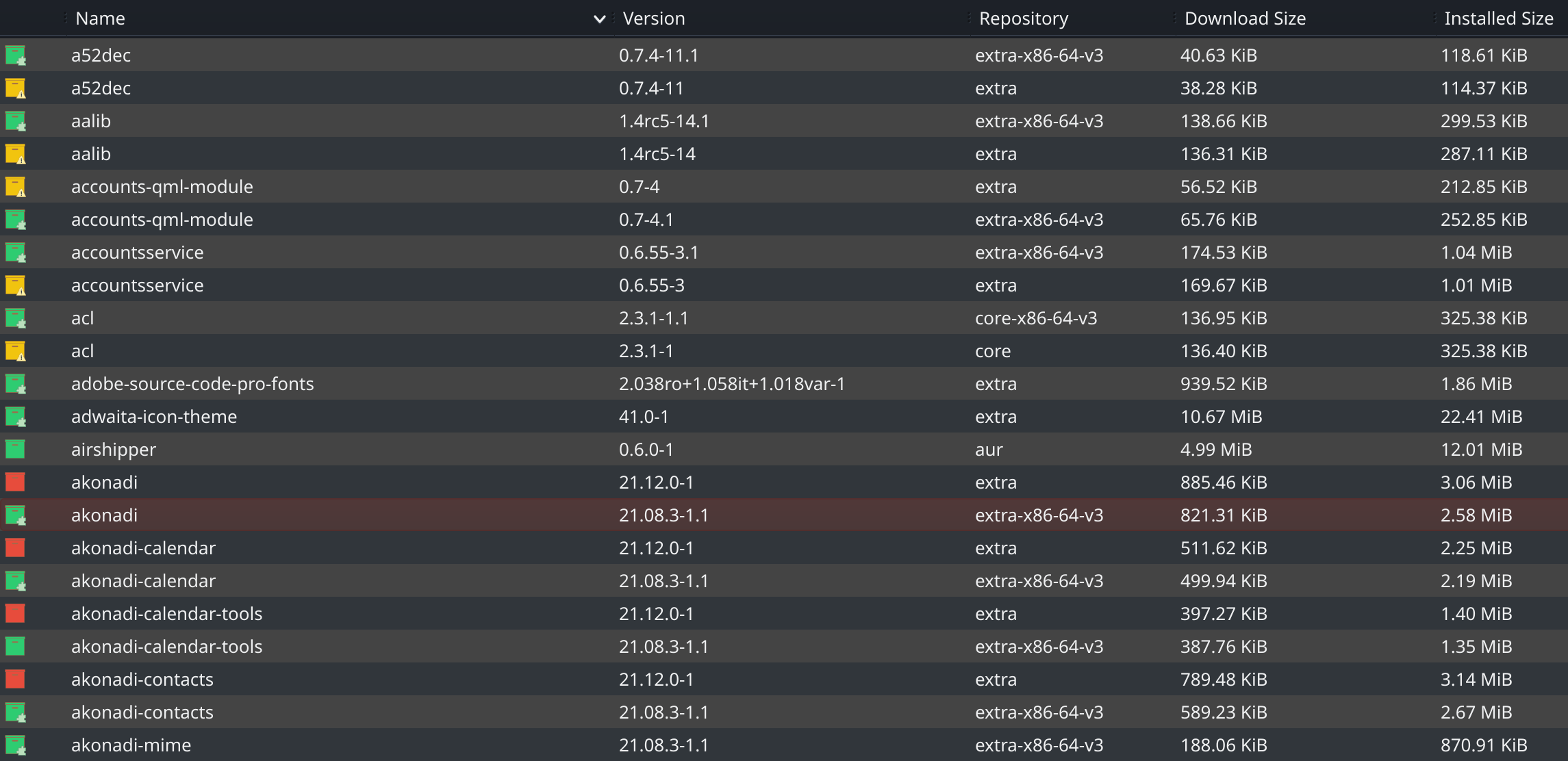
This not only takes up twice the amount of space but they're also difficult to remove because, if I do, it also removes the x86_64_v3 packages - if one is not careful, doing that manually could be potentially dangerous (might break the system?).
And if you've look closely, you may also find that some from the ALHP repos are actually older versions than the upstream ones:

And, unfortunately, removing the upstream ones could potentially cause a
partial upgradethat could render other things that depend on them broken...Just to make sure, did you make the ALHP repo before the arch repo in your
pacman.conf?Yes, I had it set like this:
Just a quick question you already upgraded your package or not?
Please use
pacmanas described in the README. I do not know what options any sort of gui/frontend passes to pacman, so there is no point in going off that information.Some packages are older than the official ones, that's indented behavior due to the fact that ALHP builds packages after they release in the official repos. The delay varies depending on which packages are currently building, build time of these packages, etc.
In general ALHP is some hours delayed at most, worst case 12h if there was a batch of really buildtime-heavy packages like
chromium,firefox,webkit,electron, etc.Please try
pacman -Suyand see what is going to be updated there. If you have already updated, then you'll not see much there of course.EDIT: You can also check for packages coming from, for example,
community-x86-64-v3, by running@anonfunc I did use it as described in the readme, I was only referencing the frontend as a means to visually display the issue - this is entirely pacman's doing.
Additionally, that command you mentioned also shows the same packages coming from the vanilla Arch repos - it only solidifies what I showed
Also, I'm getting this error now (which is unrelated but also an issue?):
I cannot reproduce any signature problems with
extra-x86-64-v3.EDIT: What mirror do you use?
Both Cloudfare and North America (since Cloudfare has been known to go down sometimes causing things like YouTube outages, I though it a good idea to keep a backup mirror)
The signature error doesn't reappear for me anymore though, for some reason :/
Is there anything we can do here? @Neko-san are you still having problems upgrading?
I don't have problems upgrading anymore 👍
Originally though, I was moreso confused that ALHP packages were considered a "newer version upgrade" to pacman; I was under the impression that both were installed but they just overwrite each other when they feel like it - which made me think of it as an unintended mess
With some details from

paru, it's de-mystified a bit:@anonfunc
Although, packages not using their real architecture names does put me at risk of making mistakes like this (mixing of architectures) if I'm not paying attention: