Post your example configurations!!
Screenshots on wayland can be taken with [grim](https://github.com/emersion/grim) in combination with [slurp](https://github.com/emersion/slurp) to select a screen area.
---
## Sunny's simple waybar
Normal view:

Expanded view:

System info on hovering on module:

Desktop:

[configuration and style here](https://git.gay/sunworms/nixos-files/src/branch/main/users/sunny/desktop/waybar)
---
## 🤖 mechabar
A mecha-themed, modular Waybar configuration.
|  |
| :------------------------------------------------------------------------------------------: |
Themes
Catppuccin:
| Mocha (default) |
| :--------------------------------------------------------------------------------------------------: |
|  |
| Macchiato |
| :------------------------------------------------------------------------------------------------------: |
|  |
| Frappe |
| :---------------------------------------------------------------------------------------------------: |
|  |
| Latte |
| :--------------------------------------------------------------------------------------------------: |
|  |
https://github.com/sejjy/mechabar
---
## 🔷 Cool Blue Waybar by MBestKing 🔷


[🖹 Configuration 🖹](https://github.com/MBestKing/dotfiles.git)
---
## 🎨 Beautiful Waybar Theme
*Modern, minimalist status bar for Hyprland*
#### 📊 Waybar Status Bar

---
#### 🖥️ Full Desktop View

✨ **Features:**
- 🌙 Clean dark aesthetic with Catppuccin colors
- 📊 Real-time system monitoring
- 🎵 Media controls integration
- ⚡ Lightweight and responsive
[📁 Configuration & Dotfiles](https://github.com/Zilero232/arch-install-kit)
---
## A simple WaybarTheme


[Config and Style files](https://github.com/soaddevgit/WaybarTheme)
## simple waybar with pomodoro timer to get started
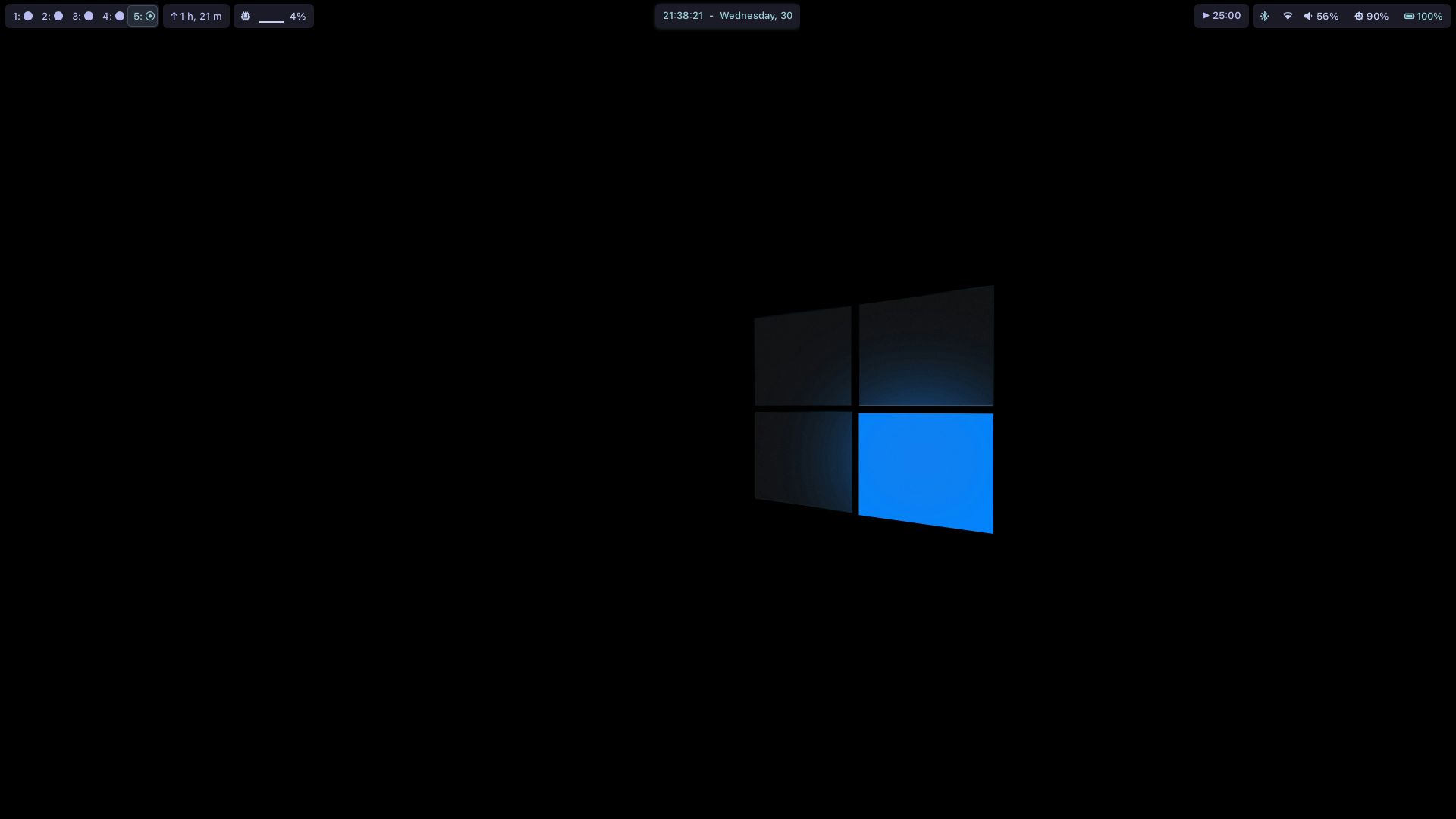
[Configuration , Style and Wallpapers](https://github.com/Prateek7071/dotfiles)
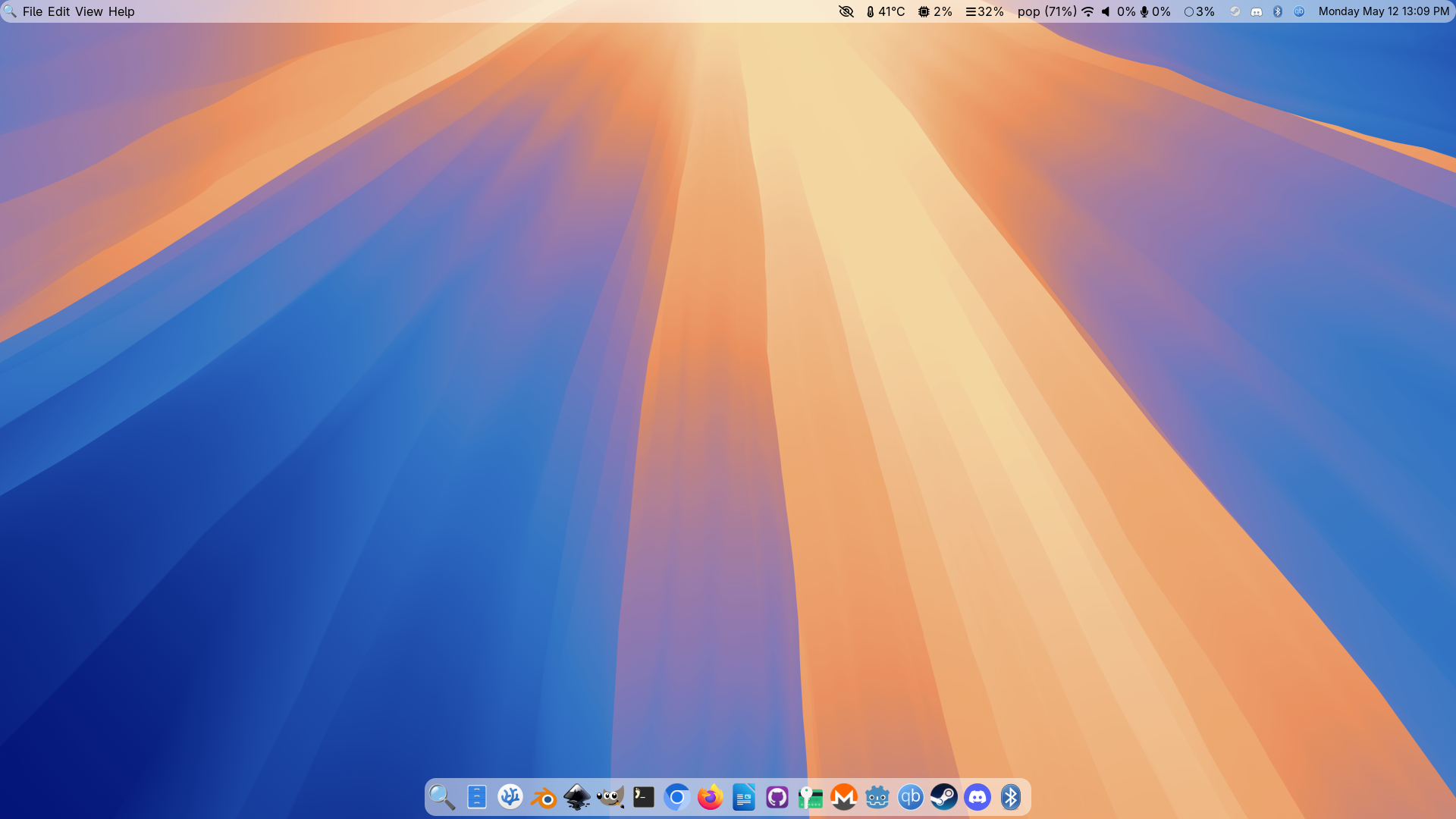
## macOS 15 Sequoia Configuration:
A sleek Waybar configuration inspired by macOS 15 Sequoia design language
[](https://github.com/kamlendras/waybar-macos-sequoia)
Top Bar
[](https://github.com/kamlendras/waybar-macos-sequoia)
Bottom Bar
[](https://github.com/kamlendras/waybar-macos-sequoia)
**Waybar macOS Sequoia** brings macOS 15's sleek design to Linux, featuring dynamic light/dark themes, Mission Control-inspired workspaces, and Sonoma-style system indicators. Optimized for Wayland compositors (Hyprland/Sway), it blends Apple's aesthetics with Waybar's flexibility for macOS enthusiasts on Linux.
[Configuration , Style and Wallpapers](https://github.com/kamlendras/waybar-macos-sequoia)
## newempeor221's Configuration:


[Config and Style](https://github.com/newemperor221/hyprland-dotfiles)
## Kian's minimalistic configuration:

[config](https://github.com/cowboycodr/dotfiles/tree/master/.config/waybar)
## Whiteshadow's Configuration:


[Dots](https://github.com/elifouts/Dotfiles)
## frankydoll's win10-like configuration:
 [Config, Style and some tips](https://github.com/TheFrankyDoll/win10-style-waybar)
## Arkboi's configuration
Used in Sway:

Colors: Everforest Dark
Changing colorscheme is very easy, in the style.css file I have a section with define-color for everforest dark, with variable names 'black, red' etc. Change the color codes in that section to whatever colorscheme you prefer.
Using on hyprland is **Not Recommended nor appreciated**, But if you want to make sure to replace sway/workspaces with hyprland/workspaces and focused with active.
[Config and style](https://github.com/arkboix/sway/tree/main/files/.config/waybar)
[Config, Style and some tips](https://github.com/TheFrankyDoll/win10-style-waybar)
## Arkboi's configuration
Used in Sway:

Colors: Everforest Dark
Changing colorscheme is very easy, in the style.css file I have a section with define-color for everforest dark, with variable names 'black, red' etc. Change the color codes in that section to whatever colorscheme you prefer.
Using on hyprland is **Not Recommended nor appreciated**, But if you want to make sure to replace sway/workspaces with hyprland/workspaces and focused with active.
[Config and style](https://github.com/arkboix/sway/tree/main/files/.config/waybar)
[Sway Config](https://github.com/arkboix/sway/)
## kamlendras's configuration:
 [Config and Style](https://github.com/kamlendras/waybar-macos-sequoia/tree/259ecb4b5a65a52ece0708fb4c65db4f57268329)
## sephid86's configuration:
[Config and Style](https://github.com/kamlendras/waybar-macos-sequoia/tree/259ecb4b5a65a52ece0708fb4c65db4f57268329)
## sephid86's configuration:
 [Config and Style](https://github.com/sephid86/fulleaf/tree/master/skel/.config/waybar)
## cjbassi's configuration:
[Config and Style](https://github.com/sephid86/fulleaf/tree/master/skel/.config/waybar)
## cjbassi's configuration:
 [Config and Style](https://github.com/cjbassi/config/tree/master/.config/waybar)
## Robinhuett's configuration:
[Config and Style](https://github.com/cjbassi/config/tree/master/.config/waybar)
## Robinhuett's configuration:
 [Config, Style and Modules](https://github.com/Robinhuett/dotfiles/tree/master/.config/waybar)
## genofire's configuration:

[Config, Style and Modules](https://gist.github.com/genofire/07234e810fcd16f9077710d4303f9a9e)
## Toger's configuration:

[Config, Style and Modules](https://gist.github.com/toger5/3a509d9a9d7ebba1e02205b00449ccff)
## Egosummiki's configuration:

[Config, Style and Modules](https://github.com/Egosummiki/dotfiles/tree/master/waybar)
## Mohammad's configuration:

The new one:
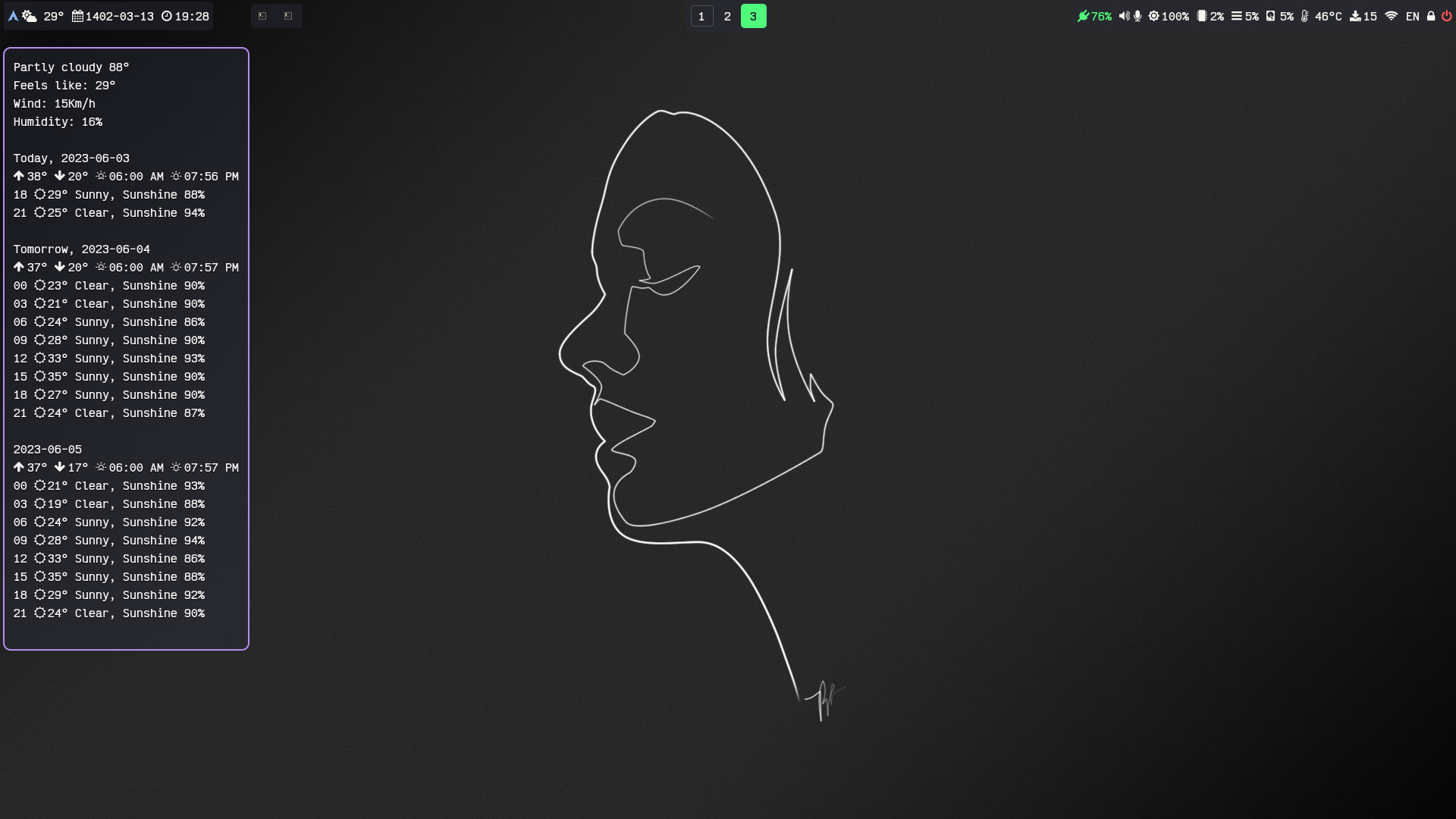
[Config and style](https://github.com/mhdzli/dotfiles/tree/home/.config/waybar) on hyprland.
## robertjk's configuration

Clean looking bar with colors matching the default Sway colors.
- [waybar/config](https://github.com/robertjk/dotfiles/blob/253b86442dae4d07d872e8b963fa33b5f8819594/.config/waybar/config)
- [waybar/style.css](https://github.com/robertjk/dotfiles/blob/253b86442dae4d07d872e8b963fa33b5f8819594/.config/waybar/style.css)
### Fonts required
Configuration uses [Cantarell](https://www.fontsquirrel.com/fonts/Cantarell) font, or [Noto Sans](https://www.fontsquirrel.com/fonts/noto-sans) as a second alternative. Then [Font Awesome](https://fontawesome.com/) is used for the icons to be displayed. You should have those installed for the default styles to work properly.
### Sway configuration
To match the font of the bar add `font pango:Cantarell 14px` to `sway/config` file.
## mxkrsv's configuration

Initially based on robertjk's configuration.
The icons are from Awesome 5, the font is JetBrains Mono.
Changing colorscheme is trivial thankfully to `@define-color`.
[Source](https://github.com/mxkrsv/dotfiles-old/tree/master/.config/waybar)
## abdus' configuration:
[Config, Style and Modules](https://github.com/Robinhuett/dotfiles/tree/master/.config/waybar)
## genofire's configuration:

[Config, Style and Modules](https://gist.github.com/genofire/07234e810fcd16f9077710d4303f9a9e)
## Toger's configuration:

[Config, Style and Modules](https://gist.github.com/toger5/3a509d9a9d7ebba1e02205b00449ccff)
## Egosummiki's configuration:

[Config, Style and Modules](https://github.com/Egosummiki/dotfiles/tree/master/waybar)
## Mohammad's configuration:

The new one:

[Config and style](https://github.com/mhdzli/dotfiles/tree/home/.config/waybar) on hyprland.
## robertjk's configuration

Clean looking bar with colors matching the default Sway colors.
- [waybar/config](https://github.com/robertjk/dotfiles/blob/253b86442dae4d07d872e8b963fa33b5f8819594/.config/waybar/config)
- [waybar/style.css](https://github.com/robertjk/dotfiles/blob/253b86442dae4d07d872e8b963fa33b5f8819594/.config/waybar/style.css)
### Fonts required
Configuration uses [Cantarell](https://www.fontsquirrel.com/fonts/Cantarell) font, or [Noto Sans](https://www.fontsquirrel.com/fonts/noto-sans) as a second alternative. Then [Font Awesome](https://fontawesome.com/) is used for the icons to be displayed. You should have those installed for the default styles to work properly.
### Sway configuration
To match the font of the bar add `font pango:Cantarell 14px` to `sway/config` file.
## mxkrsv's configuration

Initially based on robertjk's configuration.
The icons are from Awesome 5, the font is JetBrains Mono.
Changing colorscheme is trivial thankfully to `@define-color`.
[Source](https://github.com/mxkrsv/dotfiles-old/tree/master/.config/waybar)
## abdus' configuration:
 ([Config](https://github.com/abdus/dotfiles/blob/master/waybar/conf.d/config.material) and [Styles](https://github.com/abdus/dotfiles/blob/master/waybar/styles.d/style.material.css)). Required fonts are [IBM Plex Mono](https://fonts.google.com/specimen/IBM+Plex+Mono?query=IBM+plex) and [FontAwesome 5](https://fontawesome.com/download).
## oscarcp's configuration:
([Config](https://github.com/abdus/dotfiles/blob/master/waybar/conf.d/config.material) and [Styles](https://github.com/abdus/dotfiles/blob/master/waybar/styles.d/style.material.css)). Required fonts are [IBM Plex Mono](https://fonts.google.com/specimen/IBM+Plex+Mono?query=IBM+plex) and [FontAwesome 5](https://fontawesome.com/download).
## oscarcp's configuration:
 [Configuration and style](https://git.sr.ht/~oscarcp/ghostfiles/tree/master/waybar)
 ## Joe's configuration:
 [Config and Style](https://gitlab.com/jbauernberger/dotfiles/-/tree/master/.config/waybar)
[Waybar Covid19 Status Indicator Module](https://gitlab.com/jbauernberger/covid_status/)
## qoheniac's configuration
[Config and Style](https://gitlab.com/jbauernberger/dotfiles/-/tree/master/.config/waybar)
[Waybar Covid19 Status Indicator Module](https://gitlab.com/jbauernberger/covid_status/)
## qoheniac's configuration
 [Configuration and style](https://github.com/qoheniac/config/tree/main/waybar)
## dpgraham4401's configuration
[Configuration and style](https://github.com/qoheniac/config/tree/main/waybar)
## dpgraham4401's configuration
 Simple blue [Config and Styling](https://github.com/dpgraham4401/.dotfiles/tree/fedora/sway/.config/waybar) with swaynag power button
## DerAnsari's Configuration
**GruvBoxy**

Here's the [config](https://github.com/DerAnsari/hyprland-dots/tree/main/waybar) should be straightforward to understand, enjoy!
## pipshag's configuration
**Nord-like**
Simple blue [Config and Styling](https://github.com/dpgraham4401/.dotfiles/tree/fedora/sway/.config/waybar) with swaynag power button
## DerAnsari's Configuration
**GruvBoxy**

Here's the [config](https://github.com/DerAnsari/hyprland-dots/tree/main/waybar) should be straightforward to understand, enjoy!
## pipshag's configuration
**Nord-like**
 Based on Nord colors, trying to achieve a [simple interface with easy access](https://github.com/Pipshag/dotfiles_nord). Includes script to show current CPU governor as an icon and another to monitor GPU and display GPU information.
**Kittes (vertical)**

[kitties](https://github.com/Pipshag/dotfiles_kitties/), *rotated image* for better fit
## tim3dman's waybar
[](https://github.com/tim3dman/.dotfiles/blob/main/Screenshots/screenshot_2021-11-15_22-25-02_641878534.png)
[waybar config, style.css and color.css](https://github.com/tim3dman/.dotfiles/tree/main/.config/waybar)
## chaibronz' waybar config

dwm style bar w/ sway colors
Based on Nord colors, trying to achieve a [simple interface with easy access](https://github.com/Pipshag/dotfiles_nord). Includes script to show current CPU governor as an icon and another to monitor GPU and display GPU information.
**Kittes (vertical)**

[kitties](https://github.com/Pipshag/dotfiles_kitties/), *rotated image* for better fit
## tim3dman's waybar
[](https://github.com/tim3dman/.dotfiles/blob/main/Screenshots/screenshot_2021-11-15_22-25-02_641878534.png)
[waybar config, style.css and color.css](https://github.com/tim3dman/.dotfiles/tree/main/.config/waybar)
## chaibronz' waybar config

dwm style bar w/ sway colors
[config and style](https://github.com/chaibronz/waybar_conf)
## DN-debug's waybar config
used in Peux OS Sway:
design1

design2

design3

used in Peux OS Wayfire:
design1

design2

used in Peux OS River:

[config and style](https://github.com/DN-debug/waybar-examples)
## theCode-Breaker's configuration

[Config and Style](https://github.com/theCode-Breaker/riverwm/tree/main/waybar/river)
## lgaboury's configuration

[Install script and configuration](https://github.com/lgaboury/Sway-Waybar-Install-Script)
## Archttila's Catppuccin Mocha configuration:

[Config](https://github.com/hajosattila/dotfiles/blob/main/config.jsonc), [CSS](https://github.com/hajosattila/dotfiles/blob/main/style.css), [wittr script](https://github.com/hajosattila/dotfiles/blob/main/wittr.sh), and [Wallpaper](https://github.com/hajosattila/dotfiles/blob/main/wallpaper.png). Required fonts are [JetBrains Mono](https://github.com/JetBrains/JetBrainsMono). Screenshot [link](https://github.com/hajosattila/dotfiles/blob/main/desktop.png)
## bwc9876's configuration:
Top Bar

Bottom Bar

[Waybar Folder](https://github.com/Bwc9876/nix-conf/tree/main/res/waybar)
## autom4il:

The style.css is still messy, there are some leftovers that I need to remove. Quite happy, the last bar wasn't that appealing.
---
The icon theme used for the taskbar is [Candy Icons](https://github.com/EliverLara/candy-icons).
Requires a [nerd font](https://www.nerdfonts.com/#home) to render all the icons.
Also requires KDE Connect for the custom-kdeconnect module.
## mechakotik's configuration

Uses Breeze Dark colors. The font is Mononoki Nerd Font.
[Config and Style](https://github.com/mechakotik/dots/tree/25533a7216fa173fa5f9df384bd031d45f1712f4/.config/waybar)

Newer, cleaner version. Has custom module to display power profile without power-profiles-daemon required. Uses JetBrainsMono Nerd Font.
[Config and Style](https://github.com/mechakotik/dots/tree/main/.config/waybar)
## waybar-minimal config
A minimal kickstart configration for waybar.

[waybar-minimal](https://github.com/ashish-kus/waybar-minimal/)
## OriginCode's configuration
With [Gruvbox Dark](https://github.com/morhetz/gruvbox) color palette.

[Config and Style](https://github.com/OriginCode/dotfiles/tree/0093b62068c36f1ca89deb1514b6b2e0c6c3b1a9/waybar/.config/waybar)
## goecho's configuration
A sleek, modern Waybar configuration for Fedora, focusing on simplicity and essential information display.

[Config and Style](https://github.com/goecho/goecho-waybar/tree/main/waybar)
## d00m1k's configuration
Simple blue waybar

[Config and Style](https://github.com/d00m1k/SimpleBlueColorWaybar)
## niksingh710's vertical bar at Right Side with tooltips
| Bar | Bar
(Hindi) | Update Tool Tip |
|-----|----------------------------------|-----------------|
| |  |  |
Checkout the config at: [gdots](https://github.com/niksingh710/gdots)
## Anik's super waybar


dots: https://github.com/Anik200/dotfiles/blob/super-waybar/README.md
## Abhinaya's Configuration
 [**Config and Style**](https://github.com/abhinaya-aryal/.config/tree/main/waybar)
## EviLuci's waybar
Top Bar
[**Config and Style**](https://github.com/abhinaya-aryal/.config/tree/main/waybar)
## EviLuci's waybar
Top Bar
 Bottom Bar
 [Config and Style](https://github.com/EviLuci/dotfiles/tree/main/.config/waybar)
## DIvan2000's waybar

[Config and style](https://git.divan2000.su/DIvan2000/waybar-dotfiles)
## rocketmike12's waybar

[Config and Style](https://github.com/rocketmike12/.dotfiles/tree/main/waybar/.config/waybar)
## saibhargav's Waybar

[configs](https://gitlab.com/saibhargav/arch-hyprland-custom0.git)
## cxOrz's waybar

[Config and Style](https://github.com/cxOrz/dotfiles-hyprland/tree/main/waybar)
## notscripter's Configuration:

[config](https://gitlab.com/notscripter/dotfiles/-/tree/main/waybar?ref_type=heads)
## // Mocha-Power

- Catppuccin mocha colors.
- Border blinks repeatedly red when battery is low and blinks red once when discharging.
- And blinks twice cyan when full and once when charging.
[config.jsonc](https://github.com/Jan-Aarela/dotfiles/blob/main/hypr/themes/Mocha-Power/waybar.jsonc)
/ [style.css](https://github.com/Jan-Aarela/dotfiles/blob/main/hypr/themes/Mocha-Power/waybar.css)
## TollerNamen's Configuration

[dotfiles](https://github.com/TollerNamen/dotfiles/) (look at v2.1)
/ [config.jsonc](https://github.com/TollerNamen/dotfiles/blob/092ff63fc43124eaa8a7fa91411fdda8b1276e94/v2_1/config/waybar/config.jsonc)
/ [style.css](https://github.com/TollerNamen/dotfiles/blob/092ff63fc43124eaa8a7fa91411fdda8b1276e94/v2_1/config/waybar/style.css)
## ori's defaulted theme waybar

[dotfiles](https://github.com/Senior-Ori/dotfiles/blob/bdf1e48d472ed276965acc6ed1d7a7892bed1eb5/waybar/) / [config.jsonc](https://github.com/Senior-Ori/dotfiles/blob/bdf1e48d472ed276965acc6ed1d7a7892bed1eb5/waybar/config.jsonc) / [style.css](https://github.com/Senior-Ori/dotfiles/blob/bdf1e48d472ed276965acc6ed1d7a7892bed1eb5/waybar/style.css) / [scripts/now-playing.sh](https://github.com/Senior-Ori/dotfiles/blob/bdf1e48d472ed276965acc6ed1d7a7892bed1eb5/waybar/scripts/now-playing.sh)
(this should be a good starting point for hyprland users).
## Dynamic Wallust powered waybar

[Wallusty Waybar](https://github.com/saatvik333/niri-dotfiles/tree/feat/vertical-waybar/waybar)
## Harsh's waybar and wofi config with countdown and todo-lists (a good starting point for ricing)
* [config and styles here](https://github.com/Harsh-bin/waybar-config)
[Config and Style](https://github.com/EviLuci/dotfiles/tree/main/.config/waybar)
## DIvan2000's waybar

[Config and style](https://git.divan2000.su/DIvan2000/waybar-dotfiles)
## rocketmike12's waybar

[Config and Style](https://github.com/rocketmike12/.dotfiles/tree/main/waybar/.config/waybar)
## saibhargav's Waybar

[configs](https://gitlab.com/saibhargav/arch-hyprland-custom0.git)
## cxOrz's waybar

[Config and Style](https://github.com/cxOrz/dotfiles-hyprland/tree/main/waybar)
## notscripter's Configuration:

[config](https://gitlab.com/notscripter/dotfiles/-/tree/main/waybar?ref_type=heads)
## // Mocha-Power

- Catppuccin mocha colors.
- Border blinks repeatedly red when battery is low and blinks red once when discharging.
- And blinks twice cyan when full and once when charging.
[config.jsonc](https://github.com/Jan-Aarela/dotfiles/blob/main/hypr/themes/Mocha-Power/waybar.jsonc)
/ [style.css](https://github.com/Jan-Aarela/dotfiles/blob/main/hypr/themes/Mocha-Power/waybar.css)
## TollerNamen's Configuration

[dotfiles](https://github.com/TollerNamen/dotfiles/) (look at v2.1)
/ [config.jsonc](https://github.com/TollerNamen/dotfiles/blob/092ff63fc43124eaa8a7fa91411fdda8b1276e94/v2_1/config/waybar/config.jsonc)
/ [style.css](https://github.com/TollerNamen/dotfiles/blob/092ff63fc43124eaa8a7fa91411fdda8b1276e94/v2_1/config/waybar/style.css)
## ori's defaulted theme waybar

[dotfiles](https://github.com/Senior-Ori/dotfiles/blob/bdf1e48d472ed276965acc6ed1d7a7892bed1eb5/waybar/) / [config.jsonc](https://github.com/Senior-Ori/dotfiles/blob/bdf1e48d472ed276965acc6ed1d7a7892bed1eb5/waybar/config.jsonc) / [style.css](https://github.com/Senior-Ori/dotfiles/blob/bdf1e48d472ed276965acc6ed1d7a7892bed1eb5/waybar/style.css) / [scripts/now-playing.sh](https://github.com/Senior-Ori/dotfiles/blob/bdf1e48d472ed276965acc6ed1d7a7892bed1eb5/waybar/scripts/now-playing.sh)
(this should be a good starting point for hyprland users).
## Dynamic Wallust powered waybar

[Wallusty Waybar](https://github.com/saatvik333/niri-dotfiles/tree/feat/vertical-waybar/waybar)
## Harsh's waybar and wofi config with countdown and todo-lists (a good starting point for ricing)
* [config and styles here](https://github.com/Harsh-bin/waybar-config)

 **Hover effects and animation video**
https://github.com/user-attachments/assets/a5669307-f10f-4f5d-b627-59969db78f1a
**some styles with matching wofi theme**


[config and styles here](https://github.com/Harsh-bin/waybar-config)
## Sudhir's minimal Gruvbox Waybar (Vertical for Niri)
https://github.com/user-attachments/assets/dc2c2f92-f0b0-46b3-808f-c13c84500eaa
**Hover effects and animation video**
https://github.com/user-attachments/assets/a5669307-f10f-4f5d-b627-59969db78f1a
**some styles with matching wofi theme**


[config and styles here](https://github.com/Harsh-bin/waybar-config)
## Sudhir's minimal Gruvbox Waybar (Vertical for Niri)
https://github.com/user-attachments/assets/dc2c2f92-f0b0-46b3-808f-c13c84500eaa
 Both versions can be found in the dotfiles -
[Horizontal](https://github.com/Sudhboi/niri-rice-dotfiles/tree/main/.config/waybar_old_2)
[Vertical](https://github.com/Sudhboi/niri-rice-dotfiles/tree/main/.config/waybar)
Colour Themes can be changed super easily in the vertical waybar.
## Lynndroid21's ghastly status bar!~
### Top Bar
 ### Left and Right Bars

 Dotfiles: [Niri](https://github.com/Lynndroid21/Niri21) [MangoWC](https://github.com/Lynndroid21/Mango21) [Sway](https://github.com/Lynndroid21/Sway21)