
Vessel
A modern, feature-rich web interface for Ollama
Features •
Quick Start •
Documentation •
Contributing




---
## Why Vessel
**Vessel** is intentionally focused on:
- A clean, local-first UI for **Ollama**
- Minimal configuration
- Low visual and cognitive overhead
- Doing a small set of things well
If you want a **universal, highly configurable platform** → [open-webui](https://github.com/open-webui/open-webui) is a great choice.
If you want a **small, focused UI for local Ollama usage** → Vessel is built for that.
---
## Features
### Chat
- Real-time streaming responses
- Message editing with branch navigation
- Markdown rendering with syntax highlighting
- Dark/Light themes
### Tools
- **5 built-in tools**: web search, URL fetching, calculator, location, time
- **Custom tools**: Create your own in JavaScript, Python, or HTTP
- Test tools before saving with the built-in testing panel
### Models
- Browse and pull models from ollama.com
- Create custom models with embedded system prompts
- Track model updates
### Prompts
- Save and organize system prompts
- Assign default prompts to specific models
- Capability-based auto-selection (vision, code, tools, thinking)
📖 **[Full documentation on the Wiki →](https://github.com/VikingOwl91/vessel/wiki)**
---
## Screenshots

Clean chat interface
|
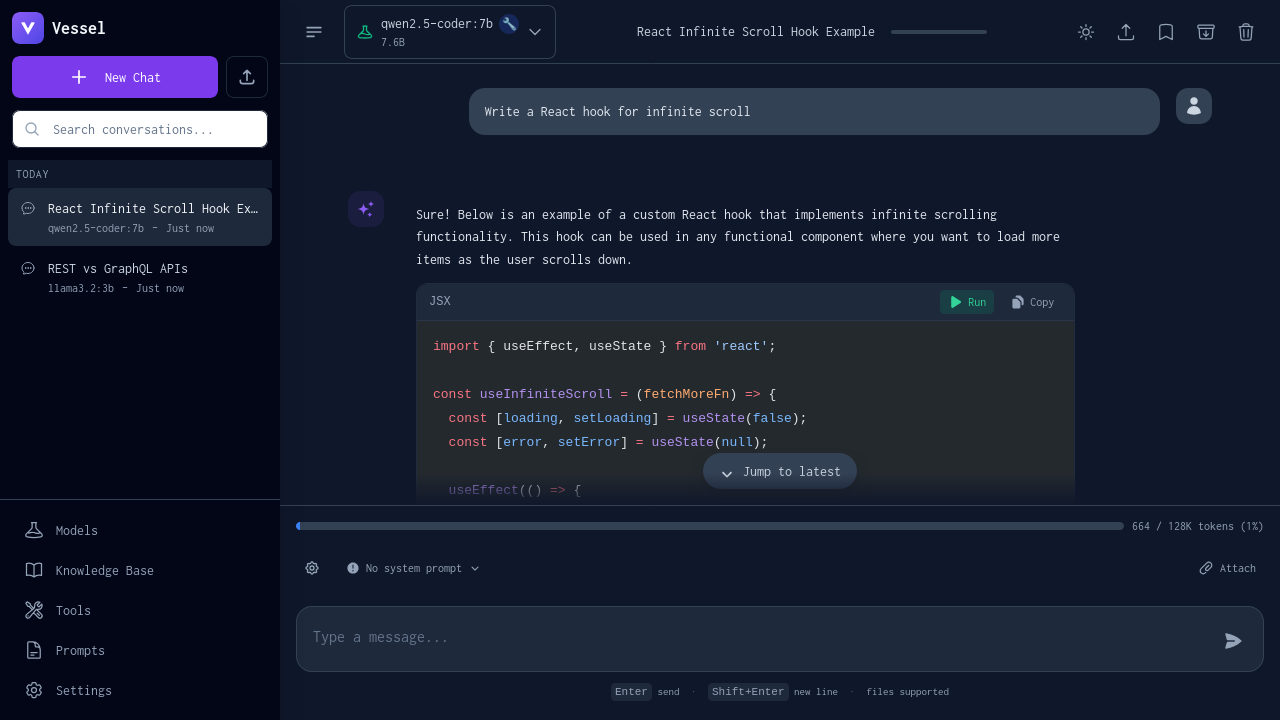
Syntax-highlighted code
|

Integrated web search
|

Model browser
|
---
## Quick Start
### Prerequisites
- [Docker](https://docs.docker.com/get-docker/) and Docker Compose
- [Ollama](https://ollama.com/download) running locally
### Configure Ollama
Ollama must listen on all interfaces for Docker to connect:
```bash
# Option A: systemd (Linux)
sudo systemctl edit ollama
# Add: Environment="OLLAMA_HOST=0.0.0.0"
sudo systemctl restart ollama
# Option B: Manual
OLLAMA_HOST=0.0.0.0 ollama serve
```
### Install
```bash
# One-line install
curl -fsSL https://somegit.dev/vikingowl/vessel/raw/main/install.sh | bash
# Or clone and run
git clone https://github.com/VikingOwl91/vessel.git
cd vessel
./install.sh
```
Open **http://localhost:7842** in your browser.
### Update / Uninstall
```bash
./install.sh --update # Update to latest
./install.sh --uninstall # Remove
```
📖 **[Detailed installation guide →](https://github.com/VikingOwl91/vessel/wiki/Getting-Started)**
---
## Documentation
Full documentation is available on the **[GitHub Wiki](https://github.com/VikingOwl91/vessel/wiki)**:
| Guide | Description |
|-------|-------------|
| [Getting Started](https://github.com/VikingOwl91/vessel/wiki/Getting-Started) | Installation and configuration |
| [Custom Tools](https://github.com/VikingOwl91/vessel/wiki/Custom-Tools) | Create JavaScript, Python, or HTTP tools |
| [System Prompts](https://github.com/VikingOwl91/vessel/wiki/System-Prompts) | Manage prompts with model defaults |
| [Custom Models](https://github.com/VikingOwl91/vessel/wiki/Custom-Models) | Create models with embedded prompts |
| [Built-in Tools](https://github.com/VikingOwl91/vessel/wiki/Built-in-Tools) | Reference for web search, calculator, etc. |
| [API Reference](https://github.com/VikingOwl91/vessel/wiki/API-Reference) | Backend endpoints |
| [Development](https://github.com/VikingOwl91/vessel/wiki/Development) | Contributing and architecture |
| [Troubleshooting](https://github.com/VikingOwl91/vessel/wiki/Troubleshooting) | Common issues and solutions |
---
## Roadmap
Vessel prioritizes **usability and simplicity** over feature breadth.
**Completed:**
- [x] Model browser with filtering and update detection
- [x] Custom tools (JavaScript, Python, HTTP)
- [x] System prompt library with model-specific defaults
- [x] Custom model creation with embedded prompts
**Planned:**
- [ ] Keyboard-first workflows
- [ ] UX polish and stability improvements
- [ ] Optional voice input/output
**Non-Goals:**
- Multi-user systems
- Cloud sync
- Plugin ecosystems
- Support for every LLM runtime
> *Do one thing well. Keep the UI out of the way.*
---
## Contributing
Contributions are welcome!
1. Fork the repository
2. Create your feature branch (`git checkout -b feature/amazing-feature`)
3. Commit your changes
4. Push and open a Pull Request
📖 **[Development guide →](https://github.com/VikingOwl91/vessel/wiki/Development)**
**Issues:** [github.com/VikingOwl91/vessel/issues](https://github.com/VikingOwl91/vessel/issues)
---
## License
GPL-3.0 — See [LICENSE](LICENSE) for details.
Made with Ollama and Svelte